Experience Lifelike images and videos in immersive with QGeeM Triple Display Docking Station
- Innovative Smart USB 3.0 Docking Station as Your "Instant Office Assistant"
-USB A Docking Station's Feature: Multiple monitors have always been a major and challenging technical issue in the USB docking industry, and QGeeM overcomes this technical hurdle and provides more interface options to expand your monitors.
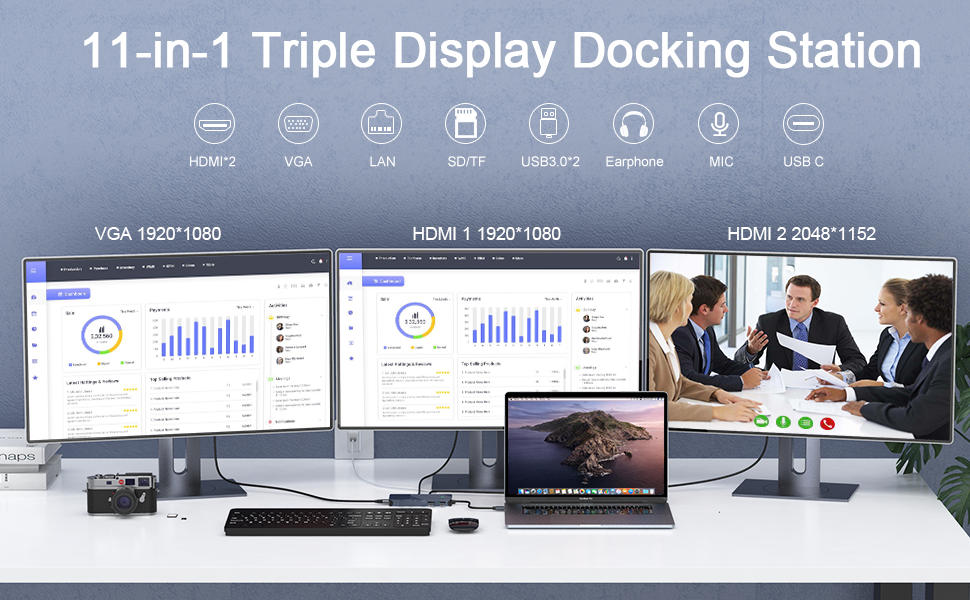
-Support Single/ Dual / Triple / Display
√ HDMI1: 2048*1152
√HDMI2: 2560*1140
√ VGA: 1080P@60(1920*1080)
-Dual display:
HDMI1+HDMI2: 2048*1152 +2048*1152
HDMI2+VGA: 2048*1152+1920*1080
-Triple Display: HDMI1+HDMI2+VGA: 2048*1152 +2048*1152 +1920*1080
*The docking station has 3 video output ports: 2 HDMI ports and 1 VGA, but during use, display mode: AAAA+AABB+AABC (HDMI1 and VGA only display the same screen
*Universal Compatibility-USB A and USB C Laptop
laptop/Desktop/phone/PC/tablet's port is USB 3.0/USB 3.1/USB C/USB4/Thunderbolt 3/Thunderbolt 4/ USB Type 3.1 Gen2/USB Type 3.1 Gen1 ect.
*Compatible Operating Systems(partial list): Windows 10 / 8.x / 7 and Macs with 10.14.x / 10.15.x /11.x. Ubuntu,Chrome os, Android ect. Not compatible with: MacOS 10.13.x and earlier, Linux / Unix, and ARM-based Windows Systems
*Compatible and incompatible devices (Not all series, for a more detailed compatibility list see the Compatibility Guide.pdf document under the Technical Specifications section below)
Kind Tips:
- Install the official DisplayLink driver in your laptop before use, the HDMI1,HDMI2 and VGA must need the latest displaylink driver to work.
- Power and Charging:This USB Dock does not provide power to the connected laptop or tablet—the USB C port can't charger you laptop. only supply the dock
- Please supply power for our USB Dock via the dock's USB-C port, before connecting too much external hard drive or multiple devices to the docking station
- Sound Setting: Windows users: Start>Setting>System>Sound: then change output/macOS users: System Preferences>Sound>Output(3.5mm headphone only vailed for HDMI2 audio)
- Display Problem: If you connect VGA and HDMI1 ports simultaneously, the 2 monitors will be limited to show the same screen.
- Due to the process of EDID (Extended Display Identification Data) communication, once you plug the monitors, it might blackout screen for a few seconds. The recovery time depends on the and monitor (1 minute at max)